Smart deadbolt diagnostics for installation, connectivity and security checks

Smart deadbolt diagnostics at a glance
A smart deadbolt is not simply a door lock with an app. In the field, the most reliable assessment separates the mechanical lock path, power system, wireless connection, credential controls and fallback entry method. Many issues that appear to be app failures start with door misalignment, bolt drag, weak batteries, poor radio placement or unclear user permissions. A practical diagnostic process should confirm that the bolt moves freely by hand, the motor can complete a lock cycle without strain, the device reports status accurately, credentials can be added and removed, firmware support is understood, and a physical key or other emergency entry method remains available. For more connected device troubleshooting perspectives, see the field diagnostics section.
Start with the door, frame and bolt path
The first mistake in smart deadbolt troubleshooting is opening the mobile app before checking the door. A motorized deadbolt can only work reliably when the underlying door hardware is aligned. If the bolt rubs against the strike plate, fails to extend fully, or needs pressure on the door to latch, the electronics may report an error even when the software is working as designed.
Before pairing or resetting the device, test the lock manually with the door open and then with the door closed. With the door open, the thumb turn or key should move the bolt smoothly. With the door closed, the same movement should require very little extra force. A clear difference often points to hinge sag, weatherstripping pressure, a shallow strike box or a misaligned strike plate.
ANSI/BHMA residential deadbolt standards, including A156.40, address characteristics such as durability, security and finish performance. Those laboratory tests are important, but they do not replace field inspection. A correctly rated deadbolt can still perform poorly if it is installed on a door that is warped, poorly bored or out of square.
Mechanical symptoms that look electronic
| Observed symptom | Likely field cause | Diagnostic action |
|---|---|---|
| Motor starts but reverses | Bolt drag or incomplete throw | Test bolt travel with the door open and inspect strike alignment |
| Batteries drain unusually fast | Motor working against friction | Check for rubbing, tight weatherstripping and loose hinges |
| Lock reports jammed status | Deadbolt cannot fully extend | Confirm bolt hole depth and plate position |
| App says locked but door moves | Door closed sensor or bolt sensor mismatch | Verify sensor calibration and actual bolt engagement |
| Key works but motor struggles | Gear load, battery weakness or internal friction | Compare manual force with powered operation |
The diagnostic principle is straightforward: if the lock is not easy to operate by hand, it is not ready for electronic testing. Correct the physical fit first, then evaluate the connected features.
Separate the access method from the network path
A smart deadbolt may support several access methods at the same time: physical key, thumb turn, keypad PIN, fingerprint reader, NFC credential, Bluetooth app control, Wi-Fi remote control, Thread, Z-Wave or Matter integration. These methods are often treated as interchangeable, but they fail in different ways and should be tested separately.
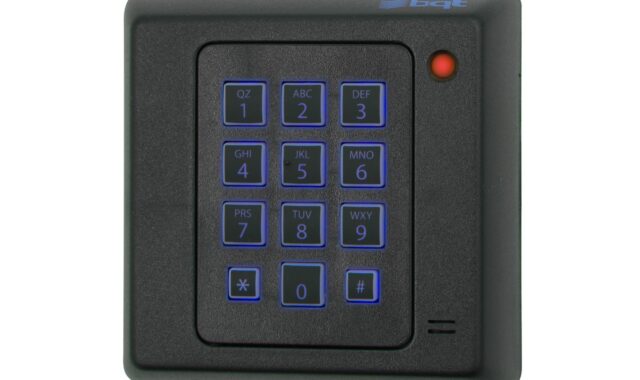
For example, a keypad failure may be caused by worn buttons, moisture, lockout rules or depleted batteries. A remote unlock failure may involve Wi-Fi coverage, a cloud service, a hub, a Thread border router or mobile app permissions. A local Bluetooth unlock failure may simply mean the phone is too far away, the app has lost permission, or another user account owns the lock.
Matter adds another layer to this discussion. The Connectivity Standards Alliance released Matter 1.0 in October 2022, and door locks were included among the early supported smart home categories. Matter can improve cross-platform setup and control, but it does not make every feature identical across Apple Home, Google Home, Amazon Alexa, Samsung SmartThings or other controllers. Platform rules can still affect remote unlock, voice unlock, PIN requirements, schedules and how much device state is exposed.
Connectivity checks by system type
| System type | What to verify | Typical field limitation |
|---|---|---|
| Bluetooth | Phone proximity, app permission and account ownership | Short range and phone-specific behavior |
| Wi-Fi | Signal level at the door, router band support and power impact | Battery life and weak signal through exterior walls |
| Thread | Border router availability and mesh coverage | Needs a healthy Thread network, not just a Wi-Fi router |
| Z-Wave | Hub compatibility, inclusion status and mesh repeaters | Dependent on hub placement and supported command classes |
| Matter | Certified pairing flow, controller support and feature exposure | Interoperability does not guarantee identical app features |
In the field, start with the shortest path. If the keypad works but remote control fails, focus on the network path. If the app works locally but not remotely, investigate the hub, cloud connection or controller. If every electronic method fails but the key works, power or internal electronics become more likely causes.
Power diagnostics should include load, not only voltage
Battery status is one of the most commonly misread smart deadbolt indicators. A lock may show an acceptable battery percentage and still fail under motor load. Cold weather, high bolt resistance, poor contacts, mixed battery brands and batteries designed for low-drain electronics can all create intermittent failures.
The safest diagnostic rule is to follow the lock manufacturer’s battery specification rather than assuming all AA batteries behave the same. Many smart locks are designed around alkaline cells, while some models allow lithium batteries and others warn against them. Rechargeable batteries may have a different nominal voltage, which can make the battery meter inaccurate or shorten the time between low-battery warnings.
Power testing should include at least three steps. First, inspect the battery compartment for corrosion, loose contacts or moisture. Second, replace all cells with a new matched set from the same package. Third, run several lock and unlock cycles with the door open and closed. If failures occur only when the door is closed, the issue is more likely mechanical load than battery chemistry alone.
Environmental conditions also matter. Exterior doors expose locks to heat, cold, vibration, sunlight and humidity. A deadbolt installed on a sheltered apartment door has a different risk profile from one installed on an exposed exterior gate or coastal entry. Field notes should record the installation environment because the same model can behave differently under different conditions.
Security diagnostics go beyond encryption claims
Security evaluation for a smart deadbolt should cover both physical resistance and digital controls. A lock can use modern encryption and still be weak if the door frame is fragile, the strike screws are short, the cylinder is low quality or unused user codes remain active. Conversely, a strong mechanical deadbolt can create digital risk if the app account is widely shared or firmware support is unclear.
For physical performance, look for independent certification language rather than vague wording such as “heavy duty” or “premium security.” BHMA’s residential certification program uses the Certified Secure Home label for residential lock and deadbolt products that meet applicable ANSI/BHMA standards. A Grade 1, Grade 2 or Grade 3 claim should be tied to a specific standard and product configuration, not treated as a universal statement about every version of a lock.
For connected security, the key questions are practical: Does the device support firmware updates? Are updates automatic or clearly communicated? Can old users, lost phones and temporary PINs be removed quickly? Does the app require strong authentication? Is there an audit log, and can the owner understand it? NIST’s consumer IoT cybersecurity baseline emphasizes capabilities such as device identification, secure configuration, data protection, interface access control, software updates and cybersecurity state awareness. Those categories translate directly into smart deadbolt field checks.
The FCC’s voluntary U.S. Cyber Trust Mark program, adopted in 2024 for wireless consumer IoT products, is also relevant for the smart lock market because it gives manufacturers a pathway to show cybersecurity conformity through labeling and registry information. It should not be confused with a mechanical lock grade, and it should not be treated as proof that a door installation is physically secure. It is one signal in a broader diagnostic picture. See also: device architecture.
In commercial or multi-tenant environments, UL 294 may appear in discussions of electronic access control systems. That standard concerns access control systems and units, not every consumer smart deadbolt sold for a single-family entry door. If a lock is part of a code-regulated access control system, installers and building owners should confirm which standards, listings and local code requirements apply before relying on a consumer product.
A practical field diagnostic workflow
When a smart deadbolt fails, random resets can erase useful evidence. A structured workflow is faster and safer because it isolates the fault before settings are changed.
- Document the failure. Record the exact symptom, user action, time, battery status, weather condition and whether the door was open or closed.
- Test manual operation. Use the key and thumb turn with the door open, then closed. Any added resistance should be corrected before app troubleshooting.
- Inspect the strike and frame. Check bolt depth, plate alignment, hinge sag and whether the door needs to be pushed or lifted to lock.
- Replace batteries as a set. Use the battery type specified by the manufacturer and clean contacts if needed.
- Run local electronic tests. Try keypad, fingerprint or Bluetooth operation before testing cloud or voice control.
- Check network path. Confirm hub, router, Thread border router or Z-Wave mesh availability depending on the lock type.
- Review user permissions. Remove expired codes, confirm owner account status and test with a known valid credential.
- Update only after baseline testing. Apply firmware or app updates after documenting the original state, unless the manufacturer identifies a critical security update.
This sequence helps avoid unnecessary replacement. If the lock passes manual operation and local electronic tests but fails remotely, replacement hardware may not solve the problem. If it fails mechanically, app resets are unlikely to help.
What to compare before selecting a smart deadbolt
Choosing a smart deadbolt should begin with the door and the use case, not only the feature list. A rental unit, owner-occupied home, small office, shared workshop and short-term accommodation all have different access patterns. A useful comparison covers installation fit, credential management, connectivity, cybersecurity support and emergency entry.
- Mechanical format: Confirm door thickness, bore pattern, backset, handing and whether the existing deadbolt can be replaced without weakening the door.
- Fallback entry: Decide whether a physical key, external battery contact, emergency power port or another backup method is required.
- Credential model: Compare permanent PINs, temporary codes, scheduled codes, mobile keys, fingerprints and audit logs.
- Connectivity model: Wi-Fi can be convenient for direct remote access, while Thread and Z-Wave usually depend on a hub or border router but may be better suited to battery-powered devices.
- Platform fit: Matter support can reduce ecosystem lock-in, but buyers should still verify the exact features exposed in their preferred app.
- Support period: Look for clear statements on firmware updates, security patches and app availability.
- Certification claims: Separate mechanical grades, smart home interoperability marks and cybersecurity labels because they measure different things.
Thread Group materials describe Thread as a low-power mesh technology designed for smart home devices such as sensors and locks. That makes it an important direction for battery-powered connected hardware. Field performance, however, still depends on the actual network layout. A lock at the edge of a building may need better mesh coverage, a closer border router or a different connectivity strategy.
Editorial view on the smart deadbolt trend
The smart deadbolt market is moving from isolated app-controlled products toward interoperable connected access devices. Matter has made cross-platform pairing a more realistic expectation since its 2022 launch, and later updates have continued to improve the experience for battery-powered devices. At the same time, cybersecurity labeling and consumer IoT baselines are pushing manufacturers to explain update support and security capabilities more clearly.
For field diagnostics, this shift changes the question. The old question was, “Does the lock connect to the app?” The better question is now, “Can the lock remain mechanically reliable, locally usable, securely managed and interoperable over its support life?” That broader view is especially important because a deadbolt sits at the boundary between digital convenience and physical access control.
Buyers and installers should avoid treating any single logo or protocol as a complete answer. Matter can help with interoperability. BHMA certification can help with mechanical performance signals. The Cyber Trust Mark can help with cybersecurity transparency when available. None of them replaces careful installation, door alignment, credential review or a documented fallback plan.
Frequently asked questions
Is a smart deadbolt less secure than a traditional deadbolt?
Not automatically. Security depends on the mechanical lock grade, door and frame strength, installation quality, credential management, firmware support and account security. A poorly installed traditional deadbolt can be weak, and a smart deadbolt with poor digital controls can add avoidable risk.
Should I choose Wi-Fi, Thread, Z-Wave or Matter?
Choose based on the building and platform. Wi-Fi can simplify remote access but may use more power. Thread is designed for low-power mesh smart home devices but needs a suitable border router. Z-Wave depends on a compatible hub and mesh. Matter can improve cross-platform compatibility, but individual platform features still need verification.
Why does my smart deadbolt say it is jammed?
The most common field cause is resistance in the bolt path. Check whether the bolt extends smoothly with the door open and closed. If it works open but fails closed, inspect the strike plate, bolt hole depth, hinges and weatherstripping before resetting the lock.
Do smart deadbolts work during a power outage?
Most battery-powered smart deadbolts can continue local operation during a building power outage, but remote functions may fail if the router, hub or border router loses power. Always confirm the model’s backup entry method before installation.
Does Matter certification mean every lock feature will work in every app?
No. Matter improves interoperability for supported device functions, but platforms may implement security policies and interface details differently. Remote unlock, voice unlock, schedules, PIN handling and sensor reporting can vary by ecosystem and product firmware.