Wireless LAN in computer networks explained for modern Wi-Fi design

What a wireless LAN means in a computer network
In computer networking, a wireless LAN is a local area network that uses radio signals to connect computers, phones, printers, sensors and other devices within a limited area, such as a home, office, school, warehouse or campus. In most modern deployments, the WLAN is built with Wi-Fi technology based on the IEEE 802.11 family of standards. Devices still join a local network, receive IP addresses and reach local or internet resources, but the final access link is wireless rather than an Ethernet cable.
For readers following broader wireless connectivity topics, WLAN is a core building block because it sits between personal-area technologies such as Bluetooth and wide-area technologies such as cellular. It is designed for shared local access, not for unlimited outdoor coverage or guaranteed carrier-grade mobility.

How a WLAN works
A WLAN has three main layers of operation: radio communication, local network access and security control. The radio layer carries frames through the air. The network layer connects those frames to a wired LAN, router, internet gateway or enterprise switching system. The security layer controls who may join, how traffic is protected, and how users or devices are separated from each other.
Access points and client devices
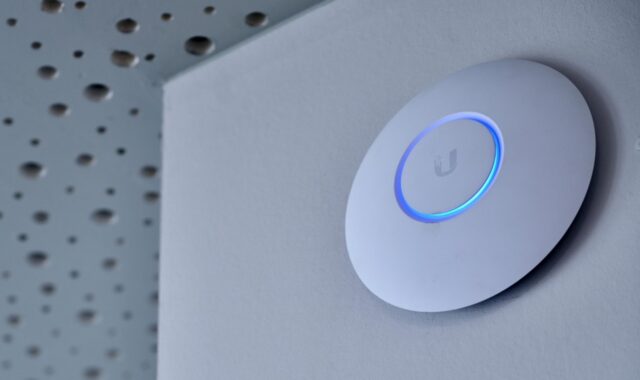
The access point, often shortened to AP, is the central device in most infrastructure-mode WLANs. It advertises one or more network names, accepts client associations, manages airtime and bridges wireless traffic to the rest of the LAN. Client devices are called stations in IEEE 802.11 terminology. A laptop, tablet, industrial scanner, IP camera or smart sensor may all be stations.
In a home router, the AP, Ethernet switch, router, firewall and broadband gateway may be combined in one box. In an enterprise building, APs usually connect back to switches and may be coordinated by a controller or cloud management platform. The user experience may look similar, but the design goals differ. A home network usually prioritizes simplicity and coverage, while an enterprise WLAN must also handle capacity, roaming, segmentation, monitoring and policy enforcement.
SSIDs, channels and bands
The SSID is the visible network name that users select. It helps users identify the correct WLAN, but it is not a security boundary by itself. Real protection comes from authentication, encryption and access policy.
Modern Wi-Fi WLANs commonly operate in 2.4 GHz, 5 GHz and, where regulators allow it, 6 GHz spectrum. The 2.4 GHz band offers longer reach but fewer non-overlapping channels and more interference from older devices and non-Wi-Fi equipment. The 5 GHz band usually provides more capacity and cleaner channels. The 6 GHz band adds substantially more spectrum in markets where it is approved; in the United States, the FCC adopted rules in 2020 making 5.925 to 7.125 GHz available for unlicensed use, subject to device classes and operating rules.
Association, authentication and data flow
When a device joins a WLAN, it scans for available networks, selects an SSID, associates with an AP, completes authentication and obtains network configuration such as an IP address. After that, data frames travel between the client and AP over the air, then move through switches, routers, servers or cloud services in much the same way as wired LAN traffic.
This is why WLAN design is not only a radio problem. A strong Wi-Fi signal cannot fix an overloaded internet connection, a misconfigured DHCP server, a slow wired backhaul or weak authentication. Good WLAN design treats the wireless and wired infrastructure as one system.
Wi-Fi standards and what they change
The IEEE 802.11 standard defines the medium access control and physical layer specifications used by wireless LANs. The Wi-Fi Alliance adds certification programs and generation names that make the technology easier to recognize in products. For example, Wi-Fi 6 maps to IEEE 802.11ax, while Wi-Fi 7 is based on IEEE 802.11be. The Wi-Fi Alliance introduced Wi-Fi CERTIFIED 7 on January 8, 2024, marking the start of an interoperability certification program for that generation.
| Wi-Fi generation | IEEE basis | Practical WLAN impact |
|---|---|---|
| Wi-Fi 4 | 802.11n | Brought wider use of MIMO and improved performance across 2.4 GHz and 5 GHz networks. |
| Wi-Fi 5 | 802.11ac | Focused on higher throughput in 5 GHz networks, especially for laptops, phones and media devices. |
| Wi-Fi 6 | 802.11ax | Improved efficiency in crowded environments with features such as OFDMA and better multi-user operation. |
| Wi-Fi 6E | 802.11ax in 6 GHz | Extended Wi-Fi 6 operation into 6 GHz spectrum where permitted, reducing congestion for compatible devices. |
| Wi-Fi 7 | 802.11be | Adds capabilities such as Multi-Link Operation, wider channels up to 320 MHz where available, and higher modulation for compatible devices. |
The table should not be read as a guarantee of real-world speed. Product boxes often highlight maximum physical-layer data rates, but application throughput is lower. It depends on signal quality, channel width, client capability, AP load, interference, protocol overhead and the wired network behind the AP.
WLAN versus wired LAN, Wi-Fi and cellular
A WLAN is not the same thing as Wi-Fi, although the terms are often used together. WLAN describes the network type: a local area network with a wireless access link. Wi-Fi describes a family of interoperable wireless technologies and certifications commonly used to build that WLAN. In practice, most people connect to a Wi-Fi network when they join a WLAN.
A wired LAN uses Ethernet cables for access. It usually offers more predictable latency, less interference and simpler power delivery through Power over Ethernet for devices such as APs and cameras. A WLAN offers mobility, faster installation, easier support for phones and tablets, and connectivity in places where cabling is difficult or expensive.
Cellular networks are different again. They are wide-area networks operated by carriers over licensed spectrum. Cellular is designed for mobility over neighborhoods, cities and highways. WLAN is designed for local ownership and local control. Many modern devices use both: Wi-Fi when indoors or near trusted local access, and cellular when moving beyond the WLAN coverage area.
Security issues that matter most
WLAN security deserves more attention than the network name and password. Because the signal travels beyond walls, attackers do not always need physical access to a switch port. NIST Special Publication 800-153, a long-standing U.S. government guide on securing WLANs, emphasizes the full lifecycle of WLAN security, including design, deployment, configuration, maintenance and monitoring.
For small networks, the baseline is to use WPA2-Personal or WPA3-Personal with a strong passphrase, update router and AP firmware, disable obsolete security modes, and avoid sharing the main network with unknown guests. WPA3-Personal improves the authentication exchange through SAE, but compatibility with older devices may still influence configuration choices. See also: device architecture.
For enterprise networks, stronger controls are usually needed:
- 802.1X authentication: Users or devices authenticate through an identity system instead of sharing one common password.
- Network segmentation: Guest, employee, IoT and administrative traffic are separated with VLANs, firewall rules or policy groups.
- Monitoring: Administrators watch for rogue APs, unusual associations, weak signal areas and authentication failures.
- Device lifecycle management: AP firmware, client drivers and security certificates are maintained before they become operational risks.
- Least privilege access: A barcode scanner, thermostat or camera should not automatically reach the same systems as an employee laptop.
Security myths can create false confidence. Hiding an SSID does not make a WLAN invisible to capable scanning tools. MAC address filtering can slow casual misuse, but it should not be treated as strong authentication. A long password helps, but it does not replace proper segmentation when untrusted devices are present.
Design choices that affect performance
Many WLAN performance problems come from planning assumptions, not from the Wi-Fi generation alone. A newer AP can help, especially when clients also support the newer standard, but poor placement, channel overlap, low-quality backhaul or excessive SSIDs can still reduce performance.
| Design factor | Why it matters | Common mistake |
|---|---|---|
| AP placement | Controls signal strength, roaming behavior and dead zones. | Placing APs only where cabling is easiest instead of where users and devices need coverage. |
| Channel planning | Reduces co-channel and adjacent-channel interference. | Using wide channels everywhere, even in dense environments where narrower channels may improve reuse. |
| Client mix | Older clients can consume more airtime for the same amount of data. | Judging the network only by the newest phone or laptop. |
| Backhaul | AP traffic eventually must move through Ethernet, mesh links or broadband. | Upgrading Wi-Fi radios while leaving a bottlenecked switch, cable or internet link in place. |
| SSID count | Each SSID adds management overhead. | Creating separate SSIDs for every small group instead of using policy-based segmentation. |
Capacity planning is especially important in offices, classrooms, hotels, event spaces and industrial sites. The question is not only whether a device can see a signal. A better question is whether enough airtime and backhaul capacity exist for the number of active clients and the applications they use. Video calls, cloud desktops, machine vision, inventory scanners and building sensors create very different traffic patterns.
When WLAN is the right choice and when it is not
A WLAN is the right choice when mobility, flexible installation and broad device compatibility matter. It is well suited to phones, tablets, laptops, meeting rooms, temporary work areas, retail handhelds, education spaces and many smart building systems. It also helps in older buildings where new cabling is disruptive.
Wired Ethernet remains the better default for fixed devices that need predictable latency, high sustained throughput, physical security or power delivery. Servers, storage systems, desktop workstations, video production systems and core network equipment usually belong on wired connections. Many networks use both approaches: Ethernet for infrastructure and high-demand fixed endpoints, WLAN for users and mobile devices.
The practical conclusion is that a wireless LAN should be designed as part of the computer network, not added as an afterthought. Standards such as IEEE 802.11 define what the radio technology can do, but real results depend on spectrum conditions, access point layout, security architecture, client support and the wired network that carries traffic beyond the AP.
Frequently asked questions
Is WLAN the same as Wi-Fi?
No. WLAN is the type of local network that uses wireless access. Wi-Fi is the most common technology used to build that WLAN. In everyday conversation the terms often overlap, but technically they describe different things.
Does a WLAN need an access point?
Most practical WLANs use one or more access points because APs connect wireless clients to the local network and internet gateway. Device-to-device wireless modes exist, but they are not the normal design for home, office or campus networking.
Which Wi-Fi band is best for a WLAN?
There is no single best band. The 2.4 GHz band can travel farther but has limited capacity. The 5 GHz band is a strong general-purpose choice for many devices. The 6 GHz band can offer more clean spectrum for Wi-Fi 6E and Wi-Fi 7 devices where regulations and client support allow it.
Why is my WLAN slower than the speed on the router box?
The number on the box is usually a maximum physical-layer rate under ideal conditions. Real application speed is lower because of distance, walls, interference, shared airtime, older clients, protocol overhead, AP load and backhaul limits.
What is the most important WLAN security step?
Use modern encryption and authentication, then separate trusted and untrusted devices. For a home, that means WPA2 or WPA3 with a strong passphrase and a guest network. For an organization, it usually means 802.1X authentication, segmentation, monitoring and regular maintenance.