Kwikset smart key lock explained for rekeying, security and smart locks

What a Kwikset SmartKey lock actually is
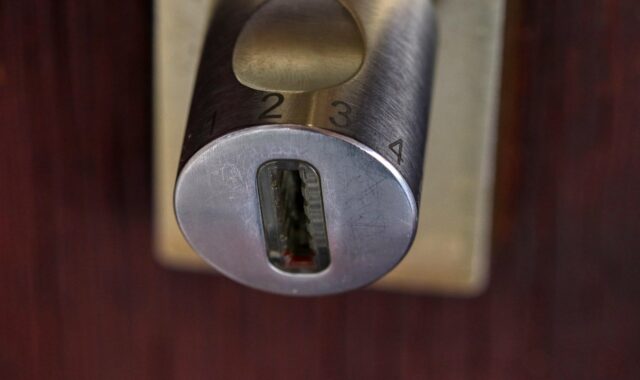
A Kwikset SmartKey lock, often searched as a kwikset smart key lock, uses Kwikset’s rekeyable SmartKey cylinder. In many common residential situations, it allows the cylinder to be rekeyed without a locksmith manually repinning it on a workbench. The practical purpose is key control: if a key is lost, a tenant moves out, a contractor no longer needs entry, or a homeowner wants several compatible Kwikset locks to share one key, the cylinder can be reset with the current working key, the SmartKey tool, and a compatible new key.
That should not be confused with a connected smart lock. SmartKey is primarily a physical keyway and cylinder technology. Some electronic and Wi-Fi locks include it, but in those products it usually serves as the backup mechanical key cylinder.

For device and hardware readers, the important point is architectural rather than cosmetic. SmartKey moves part of the rekeying process from a bench operation into the installed lock. That improves convenience, but it also creates operating rules, security assumptions, and failure modes that buyers should understand before treating every SmartKey model as equivalent. More hardware explainers are available in our device architecture section.
How SmartKey rekeying changes the cylinder workflow
Traditional residential rekeying normally means removing the cylinder, opening it, replacing pins to match a new key cut, and reassembling the lock. SmartKey changes that workflow by letting the user place the cylinder into a learn position while it remains installed on the door. Kwikset’s public support materials describe the standard process as starting with the door open, the lock in the proper locked position, the current operating key inserted, and the key rotated before the SmartKey tool is used.
In the normal process, the user inserts the current key, turns it 90 degrees clockwise, inserts and removes the SmartKey tool in the small SmartKey slot, removes the current key, inserts the new key fully, rotates it through the required motion, checks that it cannot be pulled out in the intermediate position, and returns it to the starting position. The exact instructions can vary by product manual, so the product’s own documentation should control, especially for knobs, levers, electronic locks, and deadbolts with different orientations.
The current working key matters
The most important limitation is that routine rekeying requires the current working key. That is not a minor procedural detail; it is part of the security model. If anyone could reset the lock without the current key while the cylinder remained on the door, the rekey feature would weaken access control. When the working key is unavailable, Kwikset’s professional materials discuss reset cradles or reset tools that involve cylinder removal or service procedures. For a homeowner, that usually means contacting a locksmith, using a supported reset method, or replacing the lock hardware.
Misprogramming is a real operational risk
SmartKey is convenient, but it is not foolproof. Kwikset support information identifies misprogramming scenarios when the new key is not fully inserted, or when it is pulled, pushed, lifted, or moved while the cylinder is being returned to its home position. The visible result can be frustrating: the old key no longer works, and the new key may not operate the lock reliably either. This is why the door should stay open during rekeying, why another entry route should be available, and why the new key should be tested several times before the door is closed.
SmartKey is not the same as a connected smart lock
The name can be confusing because SmartKey sounds electronic. In Kwikset’s product ecosystem, however, SmartKey usually refers to the physical cylinder. It can appear in purely mechanical deadbolts, keyed knobs, levers, handlesets, light commercial products, and the backup keyway of electronic or connected locks. A Wi-Fi model such as Kwikset Halo may use app control, access codes, notifications, batteries, and wireless connectivity, while its key cylinder can still be a SmartKey cylinder.
That distinction matters when troubleshooting access. Rekeying the physical cylinder does not delete keypad codes. Deleting app users does not change who can enter with a copied metal key. Replacing batteries does not normally change mechanical key operation. In a layered access system, the metal key, keypad code, app account, cloud account, and door hardware each need their own management procedure.
| Feature | SmartKey cylinder | Connected smart lock function |
|---|---|---|
| Primary job | Lets the physical keyway be rekeyed with the correct tool and current key | Provides keypad, app, Wi-Fi, Bluetooth, or platform control depending on model |
| Power requirement | Mechanical operation does not depend on batteries | Electronic features depend on batteries and firmware |
| Access removed by rekeying | Old metal keys that no longer match the cylinder | No direct effect on app users or PIN codes |
| Access removed by deleting a code | No direct effect on physical keys | Stops that code or account from operating the lock electronically |
| Buying check | Keyway compatibility, grade, door prep, and rekey instructions | App support, voice assistant support, battery life, notifications, and local fallback |
Security claims need model-level interpretation
Kwikset’s public SmartKey materials describe several security claims, including resistance to lock bumping, resistance to picking, a side-locking bar architecture, and drill-resistance features in some descriptions. The company has also stated that SmartKey deadbolts pass a UL 437 lock-picking test paragraph and that SmartKey products have been improved over time. These statements are useful, but they need to be read at product level. They do not mean every SmartKey product has the same residential grade, the same construction, or the same total resistance to forced entry.
Residential lock ratings are product-specific. A basic SmartKey deadbolt listing may show ANSI/BHMA Grade 3, while other Kwikset deadbolt families may advertise Grade 1 security. BHMA’s residential certification program also discusses separate performance categories such as security, durability, and finish. The practical takeaway is straightforward: the word SmartKey describes the rekeyable cylinder technology; the lock’s grade, latch design, strike installation, door material, and frame reinforcement still matter.
The 2013 vulnerability debate still shapes how people evaluate SmartKey
Security researchers publicly criticized early Kwikset SmartKey designs at Def Con, and WIRED reported on August 3, 2013 that researchers demonstrated bypass methods against SmartKey locks then in circulation. That report challenged marketing claims around resistance to certain tools and methods. Kwikset later posted a SmartKey Q&A dated January 4, 2016, saying that the latest version at that time included new proprietary security features and improved resistance to uncommon forced-entry methods. Without a current independent test for every model and generation, the safest editorial position is not to claim that all concerns were eliminated. It is more accurate to say that SmartKey has a documented history of both manufacturer security claims and researcher scrutiny.
Rekeying does not solve every door security problem
Rekeying is about key control. It can reduce the risk from old, lost, stolen, or unreturned keys, but it does not automatically strengthen a weak door frame, poor strike installation, hollow-core exterior door, exposed hinge issue, or glass panel next to a thumbturn. It also does not address digital risks on connected models, such as weak account passwords, unmanaged app sharing, reused PINs, or delayed battery replacement. A SmartKey lock should be evaluated as one component in a door system, not as the entire security system.
What to check before buying a Kwikset SmartKey lock
Start with the exact product page or packaging, not only the SmartKey badge. Check the ANSI/BHMA grade or residential rating, confirm whether the product is a deadbolt, knob, lever, handleset, or electronic lock, and verify that the door thickness and backset match the installation. Many residential deadbolts are designed for common door thicknesses and standard backsets, but assumptions can lead to a poor fit on older doors, metal doors, or doors that have been modified. See also: embedded platforms.
Next, check keyway compatibility. Kwikset support commonly references KW1 compatibility for SmartKey rekeying, while some product pages mention KW1 or SC1 keyway options depending on variant. Buyers should not assume that any random key blank will work. If the goal is to make several locks operate with one key, all cylinders need compatible keyways, and the chosen key should stay within the limits stated for those products.
Also decide whether the lock is being chosen for homeowner convenience or a property management workflow. For a single-family home, the value may be fast rekeying after moving in or after giving temporary access to service providers. For small rental operations, fast turnover can be attractive, but procedures still matter: managers need records of who held keys, when locks were rekeyed, how spare keys are controlled, and how electronic access codes are removed if the product is connected.
When SmartKey makes sense and when to look further
A SmartKey lock makes sense when the main requirement is convenient, repeatable key control on compatible Kwikset hardware. It is especially practical after moving into a home, consolidating several compatible Kwikset locks to one key, recovering from lost keys, or changing access after guests, contractors, roommates, or tenants no longer need entry. It can also be a useful backup cylinder in an electronic lock because the physical key remains available if batteries fail.
It may not be the right answer when the project requires a restricted keyway, audited commercial key control, high-security cylinders with controlled duplication, a specific commercial hardware standard, or a door assembly designed for a regulated building environment. It may also be the wrong choice if the user does not have the current working key and wants a simple no-removal reset. In those cases, a locksmith, commercial hardware specialist, or complete cylinder replacement may be more appropriate.
The balanced view is that SmartKey is a useful convenience technology with real architectural trade-offs. It reduces friction in routine rekeying, but it does not remove the need to compare model grades, follow instructions precisely, manage electronic access separately, and read security claims as model- and generation-dependent. For most residential readers, that practical understanding is more useful than asking whether SmartKey is simply good or bad.
Frequently asked questions
Can I rekey a Kwikset SmartKey lock without the original key?
Routine rekeying is designed to use the current working key, the SmartKey tool, and a compatible new key. If the current key is missing, the cylinder may need a supported reset procedure, removal, professional service, or replacement. Do not assume a no-key reset is available while the lock remains installed on the door.
Does SmartKey mean the lock is electronic?
No. SmartKey refers to Kwikset’s rekeyable physical cylinder technology. It can be used in mechanical locks and as the backup key cylinder in electronic or Wi-Fi locks. Connected features such as app control, remote locking, notifications, and access codes are separate from SmartKey rekeying.
Will rekeying remove all previous access?
It removes access for old metal keys that no longer match the cylinder, assuming the rekeying process was completed correctly. It does not remove keypad codes, app users, shared digital access, or smart home permissions on an electronic lock. Those must be managed separately.
Are all SmartKey locks the same security grade?
No. SmartKey describes the cylinder technology, not a universal grade for every lock. Individual products may carry different ANSI/BHMA grades or residential ratings. Buyers should check the exact model, not only the SmartKey branding.
Why should the door stay open during rekeying?
The door should stay open because a mistake during rekeying can leave the cylinder misprogrammed or temporarily inoperable. Keeping the door open, having another entry route, and testing the new key before closing the door reduce the risk of being locked out.