Schlage keyless locks guide for setup, compatibility, and field diagnostics
What Schlage keyless locks are designed to solve
Schlage keyless locks are not one uniform product category. The range includes simple keypad deadbolts that store codes locally, touchscreen models, Z-Wave and Zigbee connected locks, built-in Wi-Fi smart locks, and newer products that add Thread, Matter, Apple Home, Apple home keys, or Ultra Wideband features. Choosing or troubleshooting the right lock starts with three basics: the exact model, the condition of the door, and the connectivity path the lock is supposed to use.
In field work, the keypad is often not the root cause. Common issues come from door misalignment, weak 2.4 GHz Wi-Fi, the wrong battery type, a missing hub, or confusion over which app and smart home ecosystem the lock actually supports. This guide uses manufacturer documentation, Schlage support material, and current residential hardware standards as reference points, with a focus on practical setup and diagnosis for installers, property managers, and smart home owners.
Map the product family before troubleshooting
The first diagnostic step is to identify the product family. Schlage’s residential keyless range includes traditional electronic keypad locks, touchscreen locks, connected Z-Wave or Zigbee locks, built-in Wi-Fi locks, and newer locks with Thread, Matter, Apple home keys, or Ultra Wideband features. The same symptom can point to different causes depending on which family is installed. For example, app control failure on a Z-Wave model is not diagnosed the same way as app control failure on a built-in Wi-Fi model.
| Product family | Common model examples | Primary access method | Typical diagnostic focus |
|---|---|---|---|
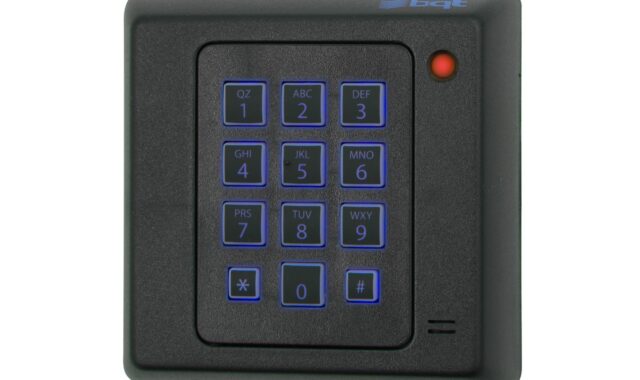
| Electronic keypad locks | BE365, FE575, FE595 | Keypad code and physical key, depending on model | Battery, programming code, keypad response, mechanical alignment |
| Touchscreen keyless locks | BE375, FE695 | Touchscreen code entry | Code storage, touchscreen response, battery condition |
| Hub-based smart deadbolts | BE468, BE469 Schlage Connect | Keypad plus Z-Wave or Zigbee platform | Hub compatibility, mesh range, platform features |
| Built-in Wi-Fi smart locks | BE489 Encode, FE789 Encode Lever, BE459 Arrive | Keypad plus Schlage Home app and Wi-Fi | 2.4 GHz Wi-Fi, app pairing, cloud reachability, battery load |
| Apple and multi-ecosystem smart deadbolts | BE499 Encode Plus, Sense Pro | Keypad, app, physical key, and supported digital keys | Apple Home, home keys, Thread or Matter setup, Wi-Fi fallback, user permissions |
Schlage’s comparison material lists different code capacities across these families. Encode and Encode Plus are commonly listed with up to 100 access codes. Arrive and Sense Pro support up to 250 unique access codes. Connect models are commonly listed around 30, while older keypad or touchscreen models are typically more limited. For a rental unit, side entrance, small office, or multi-user household, code capacity is a real operating constraint. It affects whether codes can be temporary, named, scheduled, revoked cleanly, and reviewed later.
Connectivity determines the diagnostic path
Connectivity is where many smart lock problems become confusing. A lock can be keyless without being remotely manageable. A keypad deadbolt may unlock reliably at the door but have no app path at all. A Z-Wave lock may depend on hub health and mesh range. A Wi-Fi lock may pair locally, then later show as unreachable if the cloud connection, router, or signal quality is poor.
Wi-Fi models need a clean 2.4 GHz environment
Schlage support material states that its residential Wi-Fi smart locks connect on 2.4 GHz Wi-Fi. In practice, a dual-band or tri-band router can still create setup problems if the lock, phone, and setup app are not negotiating the expected band during onboarding. In homes with aggressive band steering, a separate 2.4 GHz IoT SSID can make setup more predictable.
Security settings also matter. Schlage support describes password-protected Wi-Fi as required for pairing, with WPA or WPA2 used for many smart locks and WPA2 or WPA3 noted for Sense Pro. Open networks should not be treated as an acceptable workaround. If the lock does not see the network, check SSID visibility, password accuracy, band selection, and whether the phone is connected to the same network path being used for setup.
Thread and Matter change the hub conversation
Encode Plus and Sense Pro are important because they move part of the user experience beyond basic Wi-Fi control. Encode Plus supports Apple home keys, allowing compatible iPhone or Apple Watch users to tap to unlock through Apple Wallet. According to Schlage’s June 16, 2026 announcement, Sense Pro became available for purchase beginning June 29, 2026. It adds Matter over Thread and Schlage Converge technology using Ultra Wideband for hands-free unlocking with supported Apple devices.
Thread is designed as a low-power mesh technology for smart home devices. Matter is an application-layer standard intended to improve interoperability across ecosystems. For diagnostics, the practical question is narrower: is the lock failing locally, failing in the manufacturer app, failing in Apple Home or another ecosystem, or failing only when remote access is attempted? Each answer points to a different fault domain.
Z-Wave and Zigbee models depend on the platform
Schlage Connect models use a compatible automation or security platform rather than built-in Wi-Fi. If the keypad works but remote control does not, do not start by replacing the lock. Check the hub, the lock’s inclusion status, mesh repeaters, platform permissions, and whether the platform supports the desired lock functions. Manufacturer comparison charts also note that features can depend on the provider, meaning app behavior and available controls are not identical across every hub.
Physical installation is still the first failure point
Smart features cannot compensate for a poor mechanical installation. ANSI/BHMA residential deadbolt standards include durability, security, and finish tests, but the standard itself notes that actual use can vary with installation, door and frame construction, maintenance, and environmental conditions. That qualification matters for Schlage keyless locks. A highly rated deadbolt can still drain batteries or report lock errors if the bolt rubs the strike plate every time it extends.
Before diagnosing the app, compare operation with the door open and closed. With the door open, command the lock to extend and retract the bolt. It should move smoothly, without grinding, hesitation, or repeated motor strain. Then close the door and repeat the same test. If the symptom appears only when the door is closed, the problem is usually alignment rather than electronics.
- Check whether the deadbolt enters the strike pocket without lifting, pushing, or pulling the door.
- Inspect weatherstripping pressure, especially on exterior doors that swell or shift seasonally.
- Confirm that door thickness, backset, and bore preparation match the model’s requirements.
- Look for loose mounting screws that twist the interior assembly and bind the tailpiece.
- Verify that the physical key turns the cylinder smoothly where a keyed override is provided.
For fire-rated openings, do not assume a residential smart deadbolt is automatically acceptable. Fire door assemblies require listed hardware appropriate for that assembly. That is a code and life-safety issue, not a convenience feature.
Battery life and code management checks
Battery expectations vary by model and radio type. Schlage comparison material commonly lists up to six months for built-in Wi-Fi families such as Encode, Encode Plus, and Arrive under typical use, about one year for Connect, and longer expectations for simpler non-connected keypad or touchscreen models. Sense Pro is also described by Schlage as offering up to six months of expected battery life under standard usage.
Those figures are expectations, not guarantees. A lock that wakes frequently, fights a misaligned bolt, sits far from the router, retries cloud communication, or operates in temperature extremes can consume batteries faster. Fast battery drain should be investigated in sequence: See also: device architecture.
- Replace batteries with the manufacturer-specified alkaline type for the exact model.
- Test bolt movement with the door open and with the door closed.
- Check Wi-Fi signal at the door, not beside the router.
- Review auto-lock settings and daily traffic volume.
- Confirm that firmware updates completed successfully before judging performance.
Older keypad deadbolt documentation also warns against relying on lithium batteries in some models because they can fail quickly after warning signs appear. The safe rule is simple: follow the battery chemistry specified in the model’s guide rather than assuming that a more expensive cell is always better.
Code management needs the same discipline. For family use, a handful of permanent codes may be enough. For short-term rentals, service providers, and shared offices, named and scheduled codes reduce ambiguity. When a user reports that a code stopped working, record the lock model, code schedule, app used to create it, time zone setting, and whether the lock was online when the change was made. A code issue may be a scheduling issue, not a keypad fault.
A practical field diagnostic workflow
A useful workflow separates mechanical, electrical, network, platform, and user-permission issues. It also prevents the common mistake of factory resetting too early. A reset can erase evidence and create new pairing problems before the original cause is understood.
| Symptom | Likely area | Field check | Next action |
|---|---|---|---|
| Keypad lights but bolt will not move | Battery or motor load | Test with door open, then closed | Replace batteries and correct strike alignment before resetting |
| App shows unreachable but keypad works | Wi-Fi or cloud path | Check router internet, 2.4 GHz signal, and app status | Improve signal, power-cycle network, then refresh lock connection |
| Network list is empty during setup | Wi-Fi compatibility | Confirm 2.4 GHz SSID and supported security type | Use a dedicated 2.4 GHz SSID or adjust router settings temporarily |
| Apple home key works but app status lags | Ecosystem split | Compare Apple Home, Schlage Home, and local keypad behavior | Identify which platform is failing before removing the device |
| Battery drains faster than expected | Mechanical load or radio retries | Inspect bolt friction and signal at the installed door | Correct alignment and connectivity before blaming the battery pack |
For teams documenting access-control issues, keep photos, signal readings, model numbers, app screenshots, and timestamps in the same job note. Our field diagnostics section follows the same evidence-first approach for connected hardware problems.
A clear closeout note should include the lock model, firmware status if visible, battery type and installation date, router band used, hub or ecosystem used, door-open test result, door-closed test result, and any access-code changes made. That record is especially useful when a problem returns after weather changes, router replacement, or a smart home platform update.
How to choose a Schlage keyless lock for the actual door
The best choice depends less on the front of the package and more on the door’s role. For a low-traffic storage room or side door where remote control is unnecessary, a local keypad model may be simpler and have fewer network dependencies. For a front door where remote lock status, alerts, and guest codes matter, a built-in Wi-Fi model such as Encode or Arrive is easier than adding a separate bridge. For Apple households, Encode Plus remains relevant because of Apple home keys. For users who want Matter over Thread and hands-free unlocking with supported Apple devices, Sense Pro is the newer and more advanced path.
Do not overbuy connectivity for a door that only needs code entry. Every radio adds a diagnostic layer. At the same time, do not underbuy for a door that needs scheduled guests, audit history, and remote revocation. The strongest installation is the one where the mechanical fit, code workflow, and connectivity model all match the actual use case.
Frequently asked questions
Do Schlage keyless locks work without Wi-Fi?
Some do, and some never used Wi-Fi in the first place. Local keypad and touchscreen models can operate with stored codes. Encode-series locks can still provide local keypad and key access, but Wi-Fi is needed for the full remote app experience and many integrations.
Why does my Schlage smart lock work at the keypad but not in the app?
That usually means the local lock function is intact while the network, cloud, hub, or smart home platform path is failing. Check the router, 2.4 GHz Wi-Fi, hub status, app permissions, and whether the lock appears offline or unreachable before resetting it.
Should I use rechargeable batteries in Schlage keyless locks?
Use the battery type specified in the guide for the exact model. Many Schlage smart locks specify alkaline AA batteries, while older keypad locks may use a 9-volt alkaline battery. Rechargeable or lithium cells can behave differently and may not provide the warning pattern the lock expects.
Is a BHMA rating enough to judge security?
No. BHMA ratings are useful because they separate security, durability, and finish performance, but they are laboratory ratings. Real-world performance still depends on the door, frame, strike reinforcement, installation accuracy, maintenance, and the surrounding entry hardware.
When should a Schlage keyless lock be factory reset?
Use a factory reset after simpler checks have failed or when ownership is changing. Before resetting, document the model, symptoms, batteries, Wi-Fi environment, hub connection, and door alignment. Resetting too early can remove access codes and pairing history without solving the root cause.